

Description
Help visitors choose which optional technologies your site may use. Set up a clear cookie banner and preference center, then configure the services you want to manage.
Features
- Accept, reject, customize and withdraw optional consent.
- Consent-based loading for configured scripts and supported embeds.
- Google Consent Mode v2: Basic or Advanced mode, setup steps and an on-site check.
- Global Privacy Control and separate sale/sharing privacy choices.
- Cookie inventory with HTML and browser runtime scanning.
- Consent logs, privacy requests and dashboard statistics.
- Floating preferences button with a layer (z-index) setting, so it never covers your site menu.
- Configuration-specific text to copy into your privacy policy.
- English, Polish, French, German, Spanish and Swedish interfaces.
Why PMS Cookie Banner Lite?
The included local features are free and do not expire. No PMS account or paid licence is required. Settings and visitor records remain under your control in WordPress.
Need more tools?
PMS Cookie Banner Pro adds banner layouts, custom colors and typography, a local Media Library logo, custom preferences-button icons and placement, and higher-capacity, path-aware classification.
The paid implementation is not included in Lite. Pro replaces Lite in the same plugin folder; do not install both together. See features and plans.
Privacy
This WordPress.org edition updates through WordPress.org and contains no external updater or licence manager. Public PMS branding is optional and off by default.
PMS classification is also off by default and requires a saved administrator opt-in. After opt-in, each request to https://pmscripts.com/licenses/v1/classification/register and /v1/classification/classify contains at most 50 cookie names and 50 resource origins or normalized resource paths, with an installation ID and pseudonymous credential. PMS receives the server IP and technical headers. Cookie values, page content, URL queries and visitor consent records are not intentionally sent; names and paths can still reveal website or personal information.
If the PMS operator enables AI assistance, unfamiliar names and resource origins, and for Pro also WordPress plugin or theme folder names (not full paths), may be sent to OpenAI. Unknown cookies are researched in the background; results arrive with the next automatic retry. No OpenAI key is required in the plugin. Disabling classification stops new requests and retries while preserving the local inventory.
PMS privacy policy and service terms.
OpenAI privacy policy and service terms.
Before using it on a live site
This is a technical consent tool, not legal certification. Scanning and consent signals do not prove that every tracker is blocked. Verify your actual integrations, including third-party and server-side behavior, and adapt your privacy policy to the whole website. Visitor tags are supplied by the site administrator, not installed automatically by this plugin.
Technical Details
- Managed scripts use WordPress’s native template enhancement lifecycle, without a separate response buffer.
- A one-time WP-Cron HTML baseline runs in bounded batches. It covers the home page, regular pages, shop and supported landing pages, excluding individual posts/products, archives and technical templates.
- The administrator’s runtime scan executes page JavaScript. Keep its tab open and finish the representative queue; closing or reloading it interrupts the run.
- Accepted signed classifications are imported automatically after a completed scan, including AI-assisted results. Unresolved identities/categories remain private. Unknown retention periods or provider privacy URLs remain marked unknown. Importing a result does not create blanket domain-blocking rules.
- Policy review metadata stays in WordPress. Relevant configuration, inventory and linked local policy changes require a new review; external policy changes need manual checking. Missing or unpublished local pages cannot be marked reviewed.
- Decision logs are eligible for deletion after 180 days. Privacy requests use the saved 730–3650-day setting, with a minimum of 24 calendar months. Cleanup depends on WordPress scheduling. Consent expiry does not physically erase localStorage; separate privacy restrictions have no automatic browser expiry.
- Scan and policy notices stay on Cookie Banner screens. Appearance fields and browser observations are validated before storage or extension callbacks.
- The preferences button uses the inline “cookie” icon from Lucide (https://lucide.dev), ISC License, Copyright (c) Lucide Contributors. No external request or library is loaded.
Screenshots
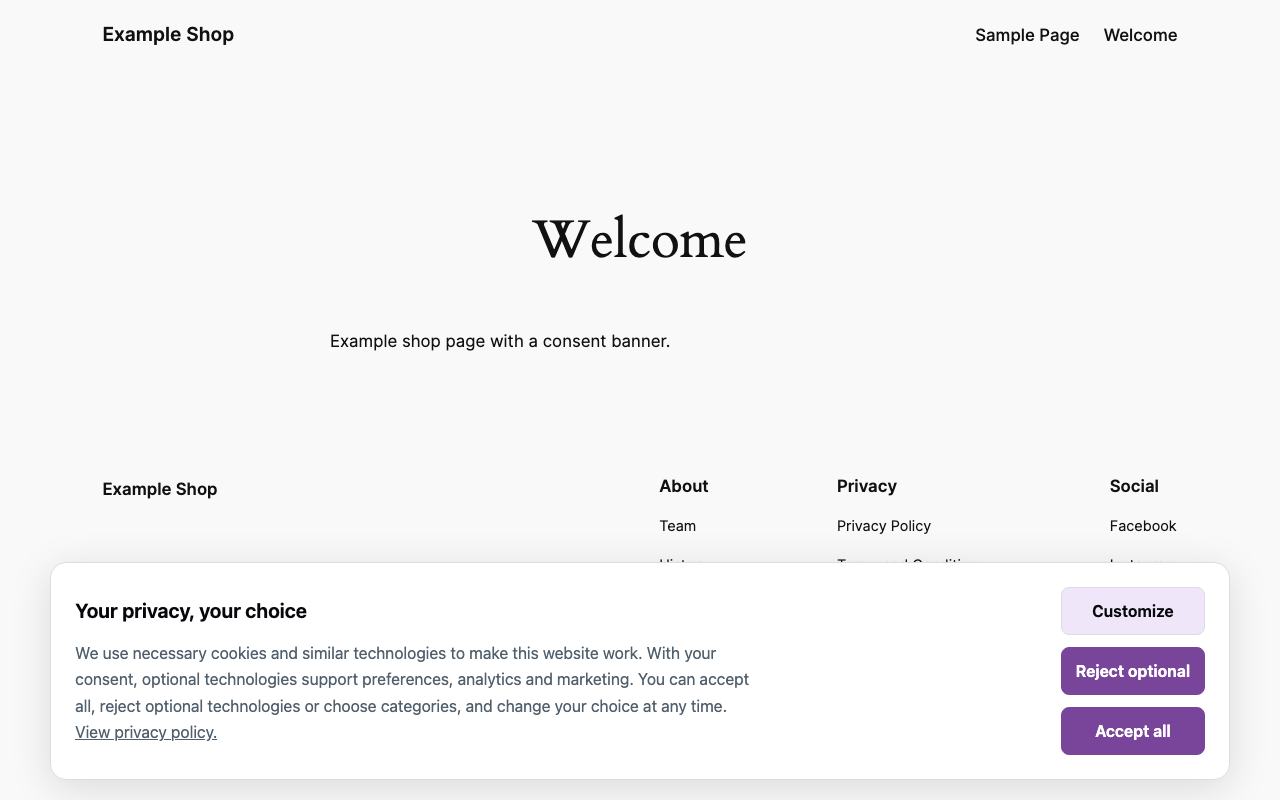
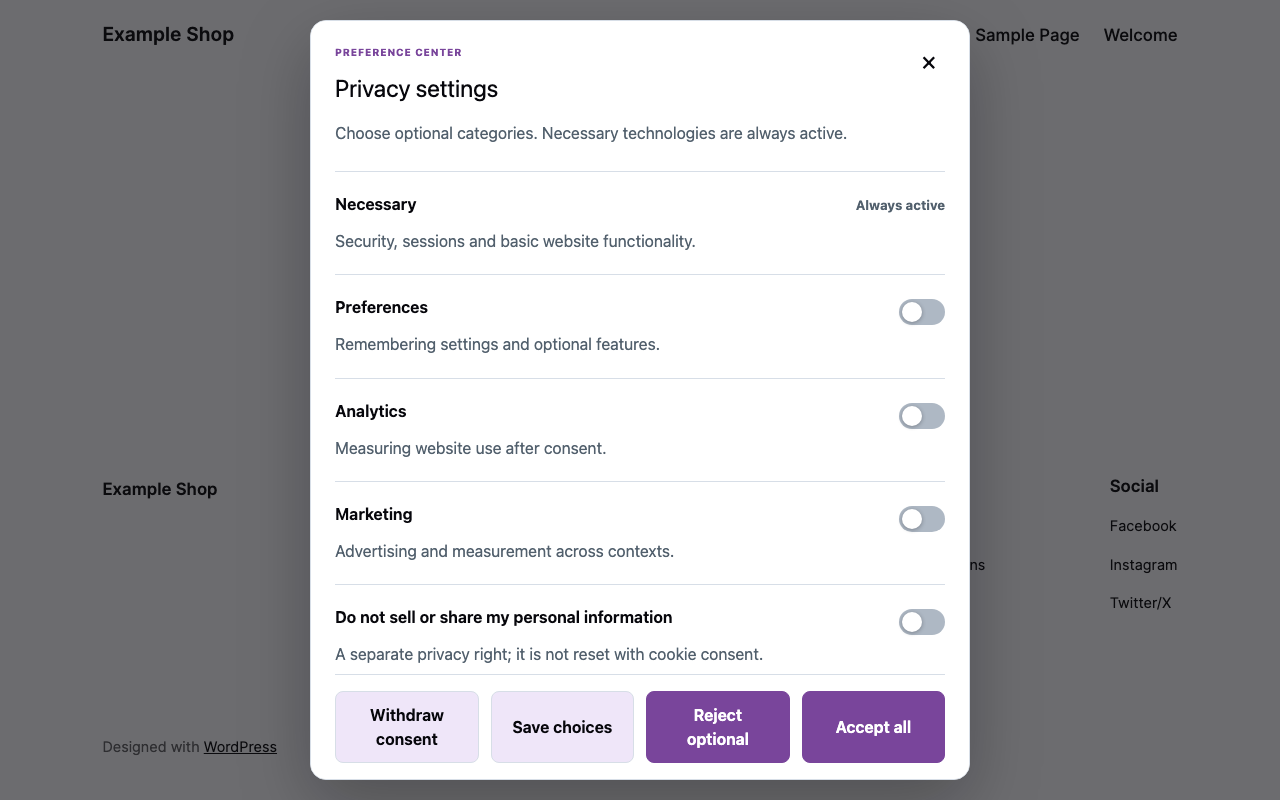
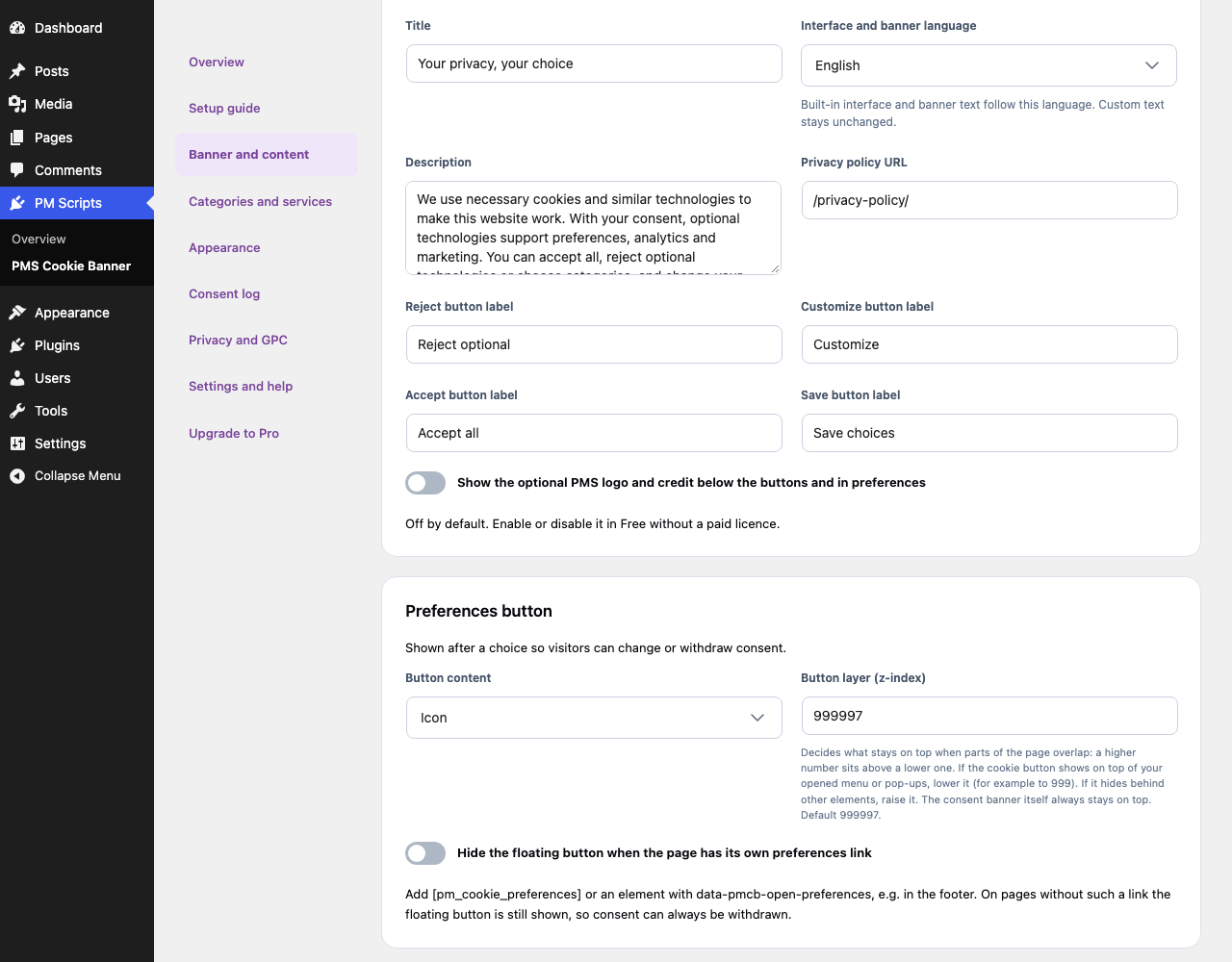
Installation
- Install and activate on WordPress 6.9 or later with PHP 7.4 or later.
- Open PM Scripts > PMS Cookie Banner and follow the setup guide.
- Review your banner, categories, services and privacy policy. Copy and adapt the policy draft in your own editor, then confirm your review.
- Test rejection, acceptance, custom choices, reopening and withdrawal as an anonymous visitor. Enable classification only if you choose the disclosed service connection.
FAQ
-
Does Google Consent Mode stop all pre-consent data?
-
Not by itself. Consent signals and script blocking are separate controls. Check your installed tags and supported integrations.
-
Does the scanner cover every visitor interaction?
-
No. It scans representative pages, not every possible interaction. Review the inventory and test the services that matter on your site.
-
Can it edit or certify my privacy policy?
-
No. It provides a draft and records your review; it never replaces the published policy.
-
How do I check consent in theme or plugin code?
-
In JavaScript call
PMCookieBanner.hasConsent('analytics'); it already ignores choices made for an older consent version. In PHP,pmcb_get_consent_version()returns the effective version stored with visitor choices. It differs from the “policy version” setting because it also covers the banner text and disclosed services:$current = function_exists( 'pmcb_get_consent_version' ) ? pmcb_get_consent_version() : ''; PMCookieBanner.policyVersion exposes the same value in the browser, and `PMCookieBanner.diagnostics()` lists blocked, failed and unmanaged resources.The banner reads its settings asynchronously. To read stored consent reliably, also on slow pages, wait for it:
window.pmcbWhenReady(api => api.hasConsent('analytics')), thepmcb:readyevent, or, in code that may run before the banner script,(window.pmcbQueue = window.pmcbQueue || []).push(api => { ... }). If the settings cannot load,pmcb:unavailablefires andpmcbWhenReady()rejects.PMCookieBanner.getServiceState('youtube')returns whether a service runs and why not (consent,gpc,opt_out,sensitive,reload). -
Do videos play when a visitor sends Global Privacy Control?
-
Yes, after a click. GPC blocks sale or sharing for services whose status is not “no”. A YouTube or Vimeo video then shows “Play video” in its place; the click is the visitor’s own request for that video, so it loads right there (YouTube in its privacy-enhanced domain). The request is not stored, and other restricted services stay blocked.
-
Can a service remove localStorage or sessionStorage after withdrawal?
-
Yes. Add keys in the service settings (
local:key,session:prefix*) or passstorage: [{type: 'local', key: 'prefix*'}]toPMCookieBanner.registerService(). Declared keys are removed when the service is no longer allowed. -
How do I set up Google Consent Mode v2?
-
Open Settings and help, choose a mode and follow the four steps shown there:
- Basic (recommended) holds recognised Google tags (GA4, Ads, Tag Manager) until consent. Advanced loads them at once with every signal denied, so Google may receive cookieless pings; that choice is yours. Off sends no signals and is only for sites where Tag Manager or another tool owns consent.
- GA4 or Ads through gtag or a plugin needs no extra code; run the scanner so the tags are recognised.
- In Google Tag Manager keep the built-in consent checks for Google tags and require additional consent for other vendors. Use only one consent tool.
- Click “Check Consent Mode on the site” and confirm in Google Tag Assistant that “Consent default: denied” comes before the tags and “Consent update” follows a choice.
Consent Mode alone does not make a site compliant and does not control non-Google tags.
-
Does it work with PixelYourSite and Pixel Cat?
-
Yes. When either plugin is active, their browser pixels and server-side events (Meta Conversions API and the other server APIs they send) follow the visitor’s categories. A necessary first-party cookie, pmcb_state, gives the server the category choices; it contains no identifier and expires with the consent. Remove other consent integrations in those plugins, such as ConsentMagic. With page caching, enable “Enable AJAX filter values update” in PixelYourSite Consent. After a visitor accepts, the plugins start on the next page view.
-
Which embeds are blocked?
-
YouTube, Vimeo, Google Maps, Spotify, SoundCloud, Calendly, Instagram, X and TikTok, including players created later by page builders such as Elementor. Visitors see a notice with “Allow and load”. A provider is disclosed only after your pages show it. Other scripts and iframes added after page load wait for consent when their domain belongs to a configured service.
Reviews
There are no reviews for this plugin.
Contributors & Developers
“PMS Cookie Banner Lite” is open source software. The following people have contributed to this plugin.
Contributors
Translate “PMS Cookie Banner Lite” into your language.
Interested in development?
Browse the code, check out the SVN repository, or subscribe to the development log by RSS.
Changelog
1.0.96
- The Save changes bar stays at the bottom of the screen while you edit settings.
1.0.95
- Settings and inline code that WordPress prints next to a script held until consent now wait with it. This prevents errors in other plugins before consent (for example the Stripe payment button reading WooCommerce order-attribution settings).
1.0.94
- The Global Privacy Control notice keeps its spacing on themes that reset the spacing of every element.
1.0.93
- Videos play under Global Privacy Control: YouTube and Vimeo show “Play video” and start in place after one click, instead of staying blocked. Service classification is unchanged.
- The page is dimmed slightly behind the consent banner, so visitors notice it; the page stays clickable.
- Preferences show the actual state of each service (active, waiting for consent, plays on click, blocked by GPC).
- Service errors name the service and the cause (no response within 10 s or loading error).
- Readiness signal for themes and plugins:
pmcbWhenReady(),PMCookieBanner.whenReady(),pmcbQueueand thepmcb:ready/pmcb:unavailableevents. - Full scan: no longer interrupted after 45 seconds on slow pages or in a background tab; the open scan tab resumes after a pause.
1.0.92
- Setup guide steps are centred on their background.
- Add-ons can pass inline styles and scripts to the banner test page.
1.0.91
- Classification notice and readme describe the current PMS service: unknown cookies are researched in the background. No change to scanning, blocking or consent.
1.0.90
- New setting “Button layer (z-index)” for the floating preferences button: lower it when the button shows on top of your opened site menu or pop-ups. The consent banner itself always stays on top. Plain-language help in all six interface languages.
1.0.89
- The services form keeps wildcard cookie patterns such as _ga* when saved and shows the matching cookie names found on the site. Services managed by integrations or built-in detection are shown read-only, so saving the form no longer turns them into fixed manual entries.
- Service descriptions recognised by the PMS scanner are shown in the banner language (purpose and retention period). Your own saved descriptions are not changed.
1.0.88
- The PixelYourSite and Pixel Cat integration discloses only the trackers those plugins are configured to load, and adds Google Ads, Microsoft Advertising (UET) and the OpenAI ads pixel.
1.0.87
- The banner now starts even when a tag plugin rewrites Google tag snippets (for example “Google Tag Manager by PYS” renaming dataLayer) or another plugin’s gtag function fails.
1.0.86
- Integration with PixelYourSite and Pixel Cat: browser pixels, server-side events (including Meta Conversions API and WooCommerce order events) and PixelYourSite’s Google Consent Mode signals follow the visitor’s choice through the necessary pmcb_state cookie.
- Built-in disclosure of the tracker SDKs and cookies these plugins use, so pixels wait for consent before the first scan.
1.0.85
- Google Consent Mode v2 modes: Basic (default, unchanged behaviour), Advanced (Google tags load with denied signals) and Off, with optional ads_data_redaction and url_passthrough.
- Setup steps in Settings and help and a read-only on-site check (
?pmcb_cm_check=1) for default order, second consent tools, Google tags and the consent state Google received. - Built-in consent notices for Google Maps, Spotify, SoundCloud, Calendly, Instagram, X and TikTok embeds.
- Scans skip the site’s own files, keep up to 200 cookie names and third-party addresses, and classify them in requests of at most 50 each. Large sites no longer end as partial after 50 resources.
1.0.84
- Block YouTube and Vimeo players, including Elementor video widgets, until consent, with an in-place “Allow and load” notice.
- Hold scripts and iframes added later by other plugins when their domain belongs to a configured service;
PMCookieBanner.diagnostics()reports blocked, failed and unmanaged resources. - One provider that fails or does not answer within 10 seconds no longer stops the remaining services; errors are reported.
- Services can declare localStorage/sessionStorage keys that are removed after withdrawal.
- Runtime scan skips pages that redirect, never leaves the scanned site, resumes after the browser leaves it and reports partial scope and exceeded limits.
- New
pmcb_get_consent_version()for theme and plugin integrations.
1.0.83
- The preferences button shows a cookie icon instead of text. Choose icon, icon and text, or text in Banner and content.
- Optionally hide the floating button when a page has its own preferences link. Pages without such a link keep the button, so consent can always be withdrawn.
1.0.82
- Preserve the WordPress script print lifecycle when loading the early cookie guard, including WooCommerce variation and checkout localization.
- Add an isolated administrator banner test for accept, reject and withdrawal without changing visitor choices or consent logs. Harden appearance previews against cookie deletion.
1.0.81
- Validate and sanitize appearance fields before extension filters; never pass the complete request to callbacks.
- Validate browser observation JSON structure, discard unrelated fields, and sanitize resource URLs before storage.
- Keep scan reminders and privacy-policy notices on Cookie Banner screens.
1.0.80
- Make the optional PMS logo and credit switch available in the WordPress.org edition. It starts off and preserves your saved choice.
1.0.79
- Isolate the browser scanner from theme styles, with explicit padding, section gaps and responsive typography.
- Show privacy-review success and errors inline below the button, preserving nonce, capability and stale-configuration checks.
- Center policy checkboxes and logging controls with their labels and adjacent inputs; punctuate links ending prose sentences.
- Privacy reminders, review controls and saved-configuration text are included locally in all six supported languages. Copy the draft directly from Privacy and GPC into any page editor; page content is never changed automatically.
- Adds spacing above the policy review card and removes forced WordPress guide/editor links.
- Keep default accessible palettes, HEX validation and consent behavior unchanged.
1.0.75
- Correct contrast guidance in all six interface languages without weakening contrast validation.
1.0.74
- Give upgrade instructions, headings, lists and actions explicit spacing; prevent narrow administration layouts from overflowing.
- Put Customize first, Reject optional second and Accept all last, with identical accept/reject colours and theme-resistant banner spacing.
- Add a configuration-aware privacy policy guide and administrator review reminders, without changing published content.
- Respect the configured privacy-request retention period, retaining the existing 24-calendar-month minimum; remove the review record during opted-in uninstall cleanup.