

Description
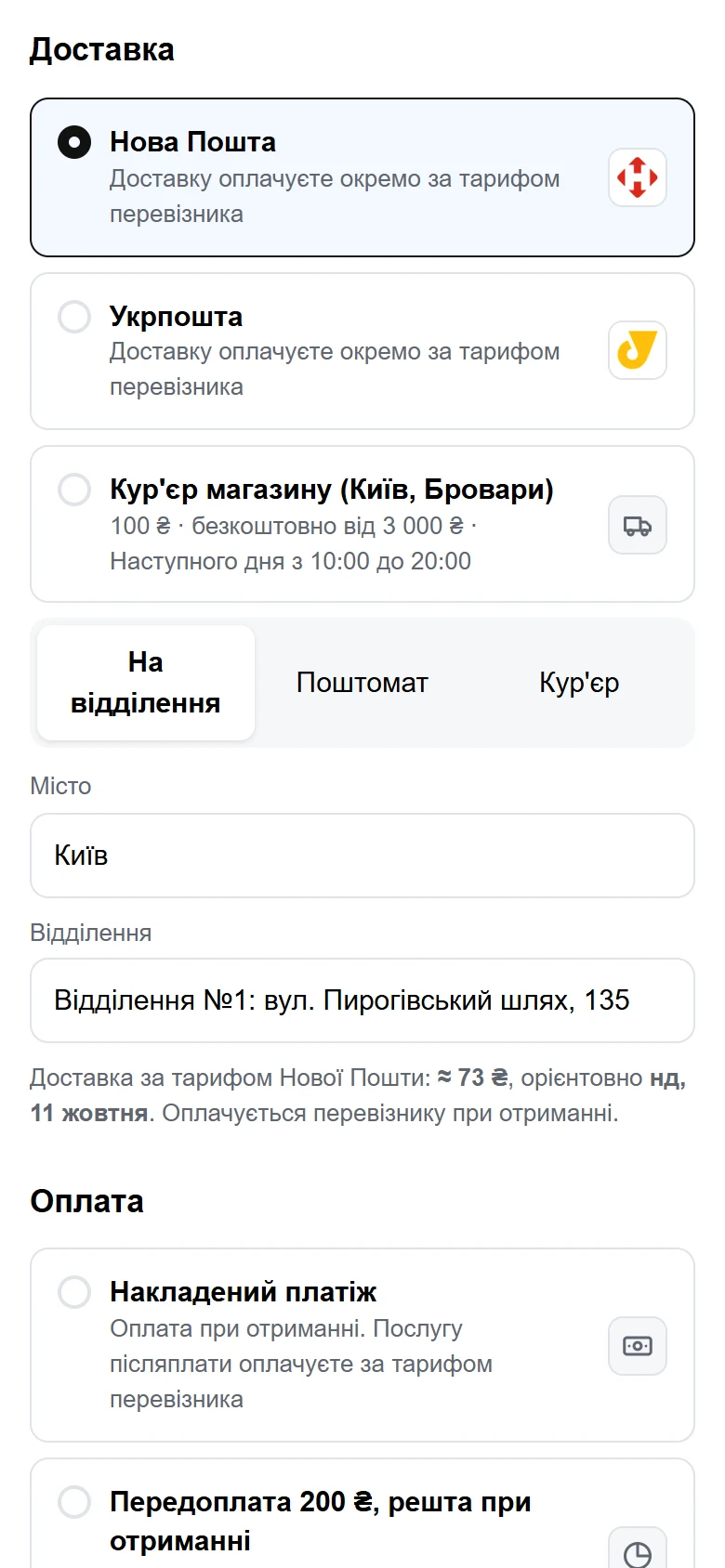
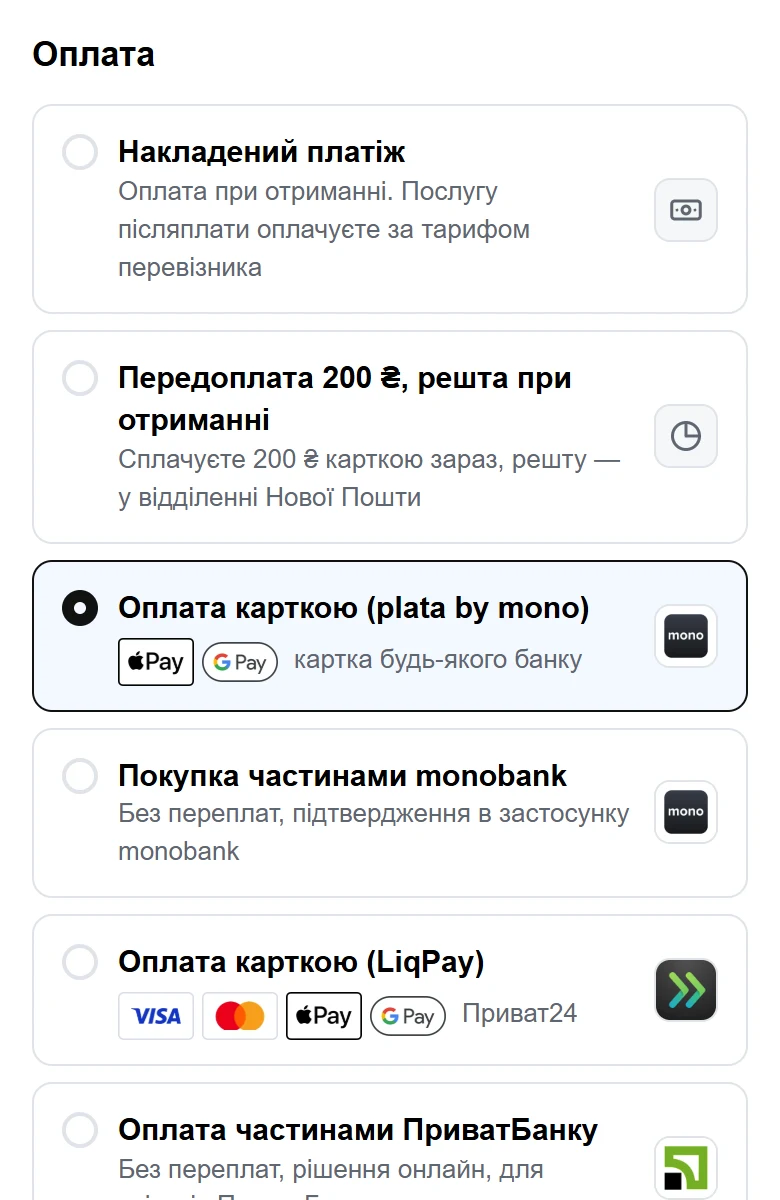
UA Checkout replaces the WooCommerce checkout page with its own one-page checkout made for Ukraine. The buyer picks a Nova Poshta branch or parcel locker or an Ukrposhta office, sees the delivery price before paying, and pays the way the store accepts: cash on delivery, a partial prepayment, or online through the store’s own monobank, LiqPay, WayForPay and other Ukrainian payment accounts. The order appears in WooCommerce as usual.
From the UA Checkout dashboard the store can also create Nova Poshta and Ukrposhta waybills, issue fiscal receipts (Checkbox, Vchasno.Kasa), pass orders to a CRM and get Telegram notifications.
The plugin itself is a thin connector: it sends the buyer from “Proceed to checkout” to the UA Checkout page with the token of their own cart. Prices, delivery and the order are handled by UA Checkout through the WooCommerce APIs. Money goes straight to the store’s own payment accounts; UA Checkout never receives buyers’ money or card data.
The plugin is off until the site’s administrator turns it on, and WooCommerce’s own checkout stays in place whenever UA Checkout does not answer.
Works with
Each service is connected in the UA Checkout dashboard with the store’s own account and keys.
- Delivery: Nova Poshta (branches, parcel lockers, courier to the door, waybills from the dashboard), Ukrposhta (offices, Standard or Express, waybills), pickup from the store, the store’s own courier.
- Payments on the UA Checkout page, straight to the store’s own accounts: cash on delivery, partial prepayment, monobank (plata by mono and monobank “Pay in parts” instalments), LiqPay (cards, Privat24 and PrivatBank “Pay in parts” instalments), WayForPay, hutko, RozetkaPay, Portmone, EasyPay, NovaPay, Tranzzo (including A-Bank and PUMB instalments), Stripe for stores with a Stripe account in a supported country, and bank transfer to the store’s IBAN. Buyers pay with Visa, Mastercard, Apple Pay or Google Pay on the provider’s page.
- Fiscal receipts: Checkbox, Vchasno.Kasa.
- CRM: KeyCRM, SalesDrive.
- SMS and Viber to the buyer: TurboSMS, AlphaSMS.
- Telegram notifications for the store owner.
- Exchange with BAS and 1C:Enterprise 8 through the program’s standard “Exchange with website” (CommerceML), on the Pro plan. UA Checkout does not sell, install or service BAS or 1C; it only exchanges data with the store’s existing base. The software list of Ukraine’s State Service of Special Communications restricts these programs for public authorities, state enterprises and critical infrastructure.
External services
This plugin connects to UA Checkout (https://ua-checkout.com), a hosted checkout service, which provides the checkout page your buyers are sent to. Nothing is sent until an administrator ticks “Turn UA Checkout on for this site” under WooCommerce UA Checkout. After that:
- On a visit to the checkout page (at most once a minute, cached), the plugin asks https://api.ua-checkout.com/woocommerce/config whether the UA Checkout checkout is on for this site. It sends the site’s host name and the plugin version.
- When a buyer goes to the checkout and UA Checkout is on, the buyer’s browser is redirected to the UA Checkout checkout page with the buyer’s WooCommerce Store API cart token, plus any utm_*, fbclid and gclid parameters of that visit. UA Checkout reads the cart, and later creates the order, through the WooCommerce REST and Store APIs with the keys the store owner approved when connecting the store.
UA Checkout terms of use: https://app.ua-checkout.com/terms
UA Checkout privacy policy: https://app.ua-checkout.com/privacy
Screenshots
Installation
- Install and activate the plugin.
- Connect the store in the UA Checkout dashboard (https://app.ua-checkout.com): “Connect a store” WooCommerce.
- In WooCommerce UA Checkout, tick “Turn UA Checkout on for this site”.
- In the dashboard, turn the checkout on: “Test” shows it only to you (open the store with ?uac_preview=1), “On” shows it to every buyer.
FAQ
-
The plugin waits at most 3 seconds for an answer. Without one, buyers stay on the standard WooCommerce checkout.
-
Can I try it without showing it to buyers?
-
Yes. Choose “Test” in the UA Checkout dashboard and open your store with ?uac_preview=1. Only that browser is sent to UA Checkout; ?uac_preview=0 turns it off again.
-
Which languages does the plugin support?
-
The settings page is in English, with translations from translate.wordpress.org. The checkout itself is in Ukrainian and English, and in Russian when the store turns that on.
Reviews
There are no reviews for this plugin.
Contributors & Developers
“UA Checkout” is open source software. The following people have contributed to this plugin.
Contributors
“UA Checkout” has been translated into 2 locales. Thank you to the translators for their contributions.
Translate “UA Checkout” into your language.
Interested in development?
Browse the code, check out the SVN repository, or subscribe to the development log by RSS.
Changelog
0.2.2
- Every function, constant, option, transient, filter and cookie now uses the plugin’s own “uacheckout” prefix.
- After updating, tick “Turn UA Checkout on for this site” again (the setting is stored under its new name).
- The terms link on the settings page points to the page that exists.
0.2.1
- Translations now come from translate.wordpress.org: bundled language files and load_plugin_textdomain() removed.
- The terms link in the readme points to the page that exists.
0.2.0
- English strings with Ukrainian and Russian translations included.
- The readme describes the external service in detail.
0.1.1
- “Back to cart” on the UA Checkout page opens the store’s cart at its real address.
0.1.0
- First version: redirect to the UA Checkout checkout, test mode, and WooCommerce’s own checkout whenever UA Checkout is unavailable.